

Android Tricks And Useful Settings : Part 1
Dig into the settings available for your Android phones and You'll find tons of clever features and useful tools.Some settings in Android Phones, which you can easily modify and keep your data safe.

Table of Contents
Introduction:
Android is one such operating system which is packed with awesome features, awesome hacks and time-saving tricks. Dig into the settings available for your Android phones and You’ll find tons of clever features and useful tools. At the beginner level, the operating system’s interface is very simple enough for casual users who just want to text , make calls and use their apps.
Some settings in Android Phones, which you can easily modify and keep your data safe.
Today we are going to discuss about those useful settings. You have to read the article completely to get complete information. So Let’s start without any delay.
Sim card lock:
Suppose you lose your phone and you want that person to not be able to access your phone’s SIM card. You have to activate this setting on our phone.
-
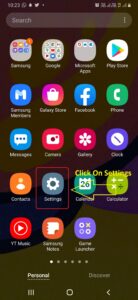
1.First go to your phone’s setting.
-
2.After that go to “security setting”.
-
3.Go to “other security settings”.
-
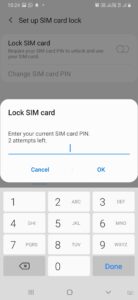
4. Set-up SIM card lock.
Step 1 step 2 step 3 step 4


Advantage :
The advantage of activate this setting will be that whenever your phone is lost or stolen, that person will not be able to access your important data or information which is saved in SIM card.
and the second advantage is that if that person wants to missuse that SIM card then he will not be able to access it without the PIN of the SIM card
If that person has entered the wrong PIN 3 times, then that SIM will be automatically deactivated, which you can activate again by calling customer service.
Google Sync Off
Does your phone run out of battery quickly, Does your phone run out of internet data and Does your phone hang ?
Are you also troubled by these problems in your phone then this blog is only for you, Read this blog completely. You will get all the information you mean in this blog.
To get rid of all these problems, you can modify this setting in your phone. Which you can activate by following the steps.
-
1.First of all go to your phone’s settings.
-
2.After that you click on the option of “Accounts and Backups”.
-
3.After that you click on the option of “Accounts” in it .
-
4.Now click on your Gmail I’d.
-
5.After this, the “Sync Account” will appear in front of you, click on it.
-
6.Here you will disable all options except two options: Contacts and Gmail.
Find my device
All the Android users have to turn ON this In-built feature setting so that in future when your phone is lost or stolen, with the help of this setting you can find your phone . To know all these things, how to turn ON this setting and how to use it. for this you have to read the blog till the last.
In the blog you have been told the step by step process which is as follows:
-
1.First go to your phone’s setting
-
2.After that scroll down and click on the Google option given below.
-
3.On this you will get the option of “Find My Device” Click on it.
-
4.Here if this option has not been activated then activate it .
Advantage:
1.The advantage of activating this option is that whenever your phone is lost or stolen, you can find the last location of your phone by installing the “Find My Device” application in someone’s else phone or by logging in with Google I’d on the desktop.
2. With the help of this feature, you can erase the data of your phone by logging in with your Gmail I’d from someone else phone.
3.With the help of this feature, after locating your Android phone’s location, you can reach that location and play ringtone sound in your lost phone even if your mobile phone is on Silent mode.
 English
 Arabic
 French
 Hindi
Hindi Punjabi
 Russian
 Spanish
 Tamil
Tamil Telugu