

Amazing tools for YouTubers. Tools, Every YouTuber Should Learn In 2022
A Youtuber make many changes to the video to make his content richer and more accessible to more people. To become a successful YouTuber, You need to take shortcuts to Beat the competition.
Table of Contents
Youtubers Toolkit:
Youtubers create content for the Internet , it’s important to think about accessibility. In the case of video, whether for your website, YouTube, Instagram, or any other social media, you make many changes to the video to make your content richer and more accessible to more people. When you make these changes manually, it takes a lot of time and research to find the right tool,
You will get the solution of this problem related to this in this article.
When you make a video, what tools will you need to overcome the following problems associated with it?
-
Auto Subtitle Generator :
You need to play subtitles with the video to expand the reach of your audience
-
Frame video editor :
Helps you work others on your videos. You can easily leave feedback to make the reviewal process so much faster.
-
Epidemic Sound :
Background music is essential to make the content/ video engaging and to keep audience engaged.
-
Screen and audio capturing:
If you are making tech-videos or any other educational videos then you need a screen or audio capture tool.
- Tool for data on popular topics, potential titles, and to A/B test your thumbnails.
Automatic Subtitle Generator :
If you live in a particular country and you have used your own language to make the video, then your audience will be from that particular country , i.e your audience will be limited . Viewers in other countries will not be able to connect to your content or video , so it is necessary to include a subtitle with the content to increase audience reach .
1.YouTube Studio:
If you have your own YouTube channel and are a YouTuber, You want to add subtitles to you videos, then you will find built-in features in YouTube itself, using which you can add subtitles to your videos. All you have to do is go to your channel and follow the steps given below.
- Login to your YouTube account

- Click on your account Logo in the upper right corner.

- If you are using YouTube studio beta then after above step you will get option of “YouTube Studio” in option List.

- On the Left, click “Subtitle” in the options below the account logo.
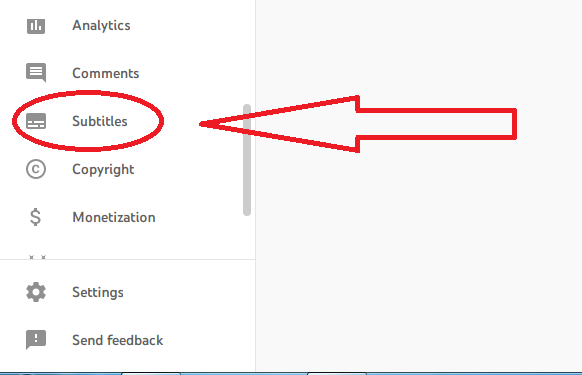
- Click on the title of the video to which you want to add subtitles.
Select Video Language (e.g.English / Hindi or any other lang.) > “Add” Button ( Below the Title and description column) > Click on “Subtitle” in the lower Right corner.
On this you will see that the subtitles have come according to your video language, which you can also edit manually.
- After editing, click publish edits.
2. VEED.IO
is an online free automatic subtitle generator that gives you various options to add subtitles to your videos. You can also insert them permanently by rendering them in a video or by downloading them as a separate file in different format such as SRT, VTT and TXT.
3. Subly
It’s a free and paid subtitle tool that will help you add subtitles to your videos in minutes. This reduces the need to manually subtitle videos and you can also choose how they look to be on-brand.
It’s very easy to run, all you have to do is sign-up and then upload the file . You can either enter that file to be uploaded or If that file is already on any platform then you can also upload it by entering its URL. After that you choose the language spoken in the video. Afterwards click on Upload & Transcribe. Your file is ready with Subtitle.
4. Zub-Title

You can transcribe speeches from your videos with “Zubtitles”
and add subtitles automatically. Captions are being customized according to the video format.
Easy to run
Sign_up > Add new video > Select Language > upload file > Edit subtitles (if any grammatically mistake ) > Download the video
5. Kapwing

This is also Video editing website, In this you can put your LOGO, Text, Images or any other Element in the video.
You can also try these for auto subtitle generator :
6. Flixier :
No account required 
Open the website >
Choose video >
Upload Video >
Edit Subtitles (If any grammatical mistake
“Export” Video ( top right corner)
7.Happyscribe
Sign-up

Upload the Video
Edit Subtitle
Export / download
8. SubtitleBee
9. Maestra
10. Auto subtitle
11. Otter.ai
Frame Video Editors:
Allows you upload the files 5X faster than competitors, directly comment on clips, create live videos to get your message across clearly, and compare versions side-by-side.
Background Music:
Sound effects to make things more vibes.
We need good royalty free music to make video so that our content does not have any copyright issue.
Screen And Audio Capturing Tools: Free tools
Free and open source software for video recording and live recording.
It is a free screen recorder with built-in audio/video editor. It has a interface that allows you to the record both the whole screen and portion of your screen.
It is good choice for one time or occasional users with minimum editing needs.
OS: window and MAC
A screen recorder with a native cloud-based gallery for storing and sharing videos.
A perfect screen recording tool for making quick video clips and sharing them on YouTube
 English
 Arabic
 French
 Hindi
Hindi Punjabi
 Russian
 Spanish
 Tamil
Tamil Telugu